


Redirects
To administer redirects and rid your site of 404 pages, go to "Modules -> All modules -> Redirects".
The module allows you to create a redirect from a non-existent site page to its existing equivalent, so that there is no 404.

1. Search with transition to the result and search with the output of the result on the list page
2. Editing and creating a redirect from the old url to the new one.
3. Mass redirect creation allows you to create several parameters at once as a list.
Create\Edit
Redirects are automatically created when deleting a product. A redirect is created to its category. If the product was created with the same link, the redirect is deleted.
A redirect is also created and deleted automatically when the product activity changes.
Attention. Automatic redirect removal does not work when using imports and requires rechecking and manual intervention.
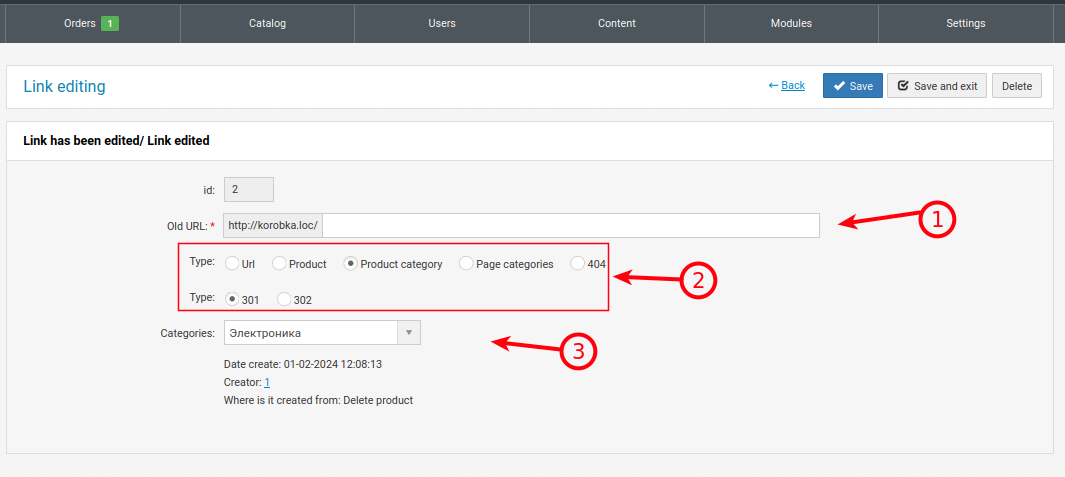
1. The link from which the redirect will be performed. It must begin without the initial slash "/" (example catalog/test). If the site is multilingual, the link will be recognized in different languages.
2. The type, to which link and with what code to redirect. 301 - search bots define this as a permanent redirect. 302 - bots define this as a temporary redirect.
3. Where the redirect will be made (category, product, just a link). Depends on the selected type.
Mass redirect creation

1. Only 1 space is needed between parameters. More spaces or TAB will result in incorrect data recognition.
Example (UrlFrom UrlTo Type):
/product/tovar shop/product/tovar 301
/product/tovar1 shop/product/tovar 301
/product/tovar2 shop/product/tovar 301
/product/tovar3 shop/product/tovar 301