


Working with the database and generating Propel models
Product categories and product models work with the help of ORM Propel. Propel allows you to automatically generate classes for quick access to fields in the database tables. schema.xml and propel.yaml in the root of the site will help us with this.
Preparing to generate a model
1. Entering a field into schema.xml. Basic 4 schemes by paths are used.
// for working with the common route table
/application/modules/core/schema.xml

// scheme of goods, categories and the whole shop
/application/modules/shop/schema.xml

// scheme of smart_filter tables
/application/modules/smart_filter/schema.xml

// scheme of banner tables
/application/modules/xbanners/schema.xml
2. Having selected which schema.xml the modification relates to, we look for the required table.
2.1. If the table being modified has <behavior name="i18n"> (behavior for communication with i18n multilingualism).
Example shop_category:
In <table name="shop_category">
add a new field
<column name="new_our_field" type="varchar" size="255" />
Full example:
<?xml version="1.0" encoding="UTF-8"?>
<database name="Shop" defaultIdMethod="native" baseClass="CMSFactory\PropelBaseModelClass" heavyIndexing="true"
          package="shop.models">
    <table name="shop_category" phpName="SCategory">
        <vendor type="mysql">
            <parameter name="Charset" value="utf8"/>
        </vendor>
        .......
        <column name="new_our_field" type="varchar" size="255" />
        ........
    </table>
</database>
2.2. If the target table referenced by <behavior name="i18n"> changes, then you need to add both to the referenced table and to the table referenced by behavior.
Example, make the field new_our_field multilingual in shop_category_i18n:
In <table name="shop_category">
add a new field
<column name="new_our_field" type="varchar" size="255" />
immediately add the field "new_our_field" to:
<behavior name="i18n">
         <parameter name="i18n_columns" value="name, h1, description, new_our_field"/>
         <parameter name="default_locale" value="ru"/>
</behavior>
In <table name="shop_category_i18n">
add a new field
<column name="new_our_field" type="varchar" size="255" />
Full example:
<?xml version="1.0" encoding="UTF-8"?>
<database name="Shop" defaultIdMethod="native" baseClass="CMSFactory\PropelBaseModelClass" heavyIndexing="true"
          package="shop.models">
    <table name="shop_category" phpName="SCategory">
        <vendor type="mysql">
            <parameter name="Charset" value="utf8"/>
        </vendor>
        .......
        <column name="new_our_field" type="varchar" size="255" />

        <behavior name="i18n">
            <parameter name="i18n_columns" value="name, h1, description, new_our_field"/>
            <parameter name="default_locale" value="en"/>
        </behavior>
        ........
    </table>

    <table name="shop_category_i18n" phpName="SCategoryI18n">
        <vendor type="mysql">
            <parameter name="Charset" value="utf8"/>
        </vendor>
        ........
        <column name="new_our_field" type="varchar" size="255" />
        ........
    </table>
</database>
3. Create the required field with your parameters in the desired table in mysql. For example shop_category or shop_category_i18n.
ALTER TABLE `your_table` ADD `new_our_field` VARCHAR(255) CHARACTER SET utf8 COLLATE utf8_general_ci NOT NULL DEFAULT '';
Model generation in Linux
1. We go to the root of our project from the terminal:
// The root of the project should contain propel.yaml
cd /var/www/project.loc
2. While in the project, run the model generation command (in Linux, php of the required version must be installed globally)
/var/www/project.loc> ./application/third_party/propel/propel/bin/propel -v build
Model generation in Windows
1. If php is not installed globally and the "php -v" command does not respond in the Bash console, then you need to download the php version that your site will work with (v7.2-7.4).
2. Go to the Bash console project
// The project root must contain propel.yaml
C:\> cd .\OSPanel\domains\project.loc
3. Command for generation in the project root (For example, php is located in the path "C:\php74\php.exe")
C:\OSPanel\domains\project.loc> C:\php74\php.exe .\application\third_party\propel\propel\bin\propel -v build
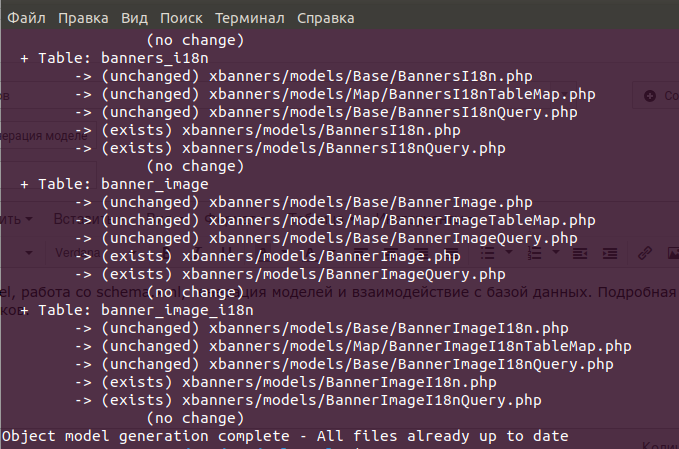 If the generation is successful, there will be a log and this message. Otherwise, you can read the Propel ORM documentation.
Usage
<?php

/* Call the category model */
$category = \SCategoryQuery::create()
          ->joinWithI18n('en', 'INNER_JOIN')
            ->filterById($id)
            ->findOne();

/* Reading from our field new_our_field (Propel translates from snake_case to camelCase itself) */
$new_our_field = $category->getNewOurField();

/* Writing to the field */
$category->setNewOurField($new_our_field . '- additional text')
          ->save(); // Saving to the database