


Sending SMS
To set up sending notifications via SMS, go to "Modules -> All modules -> Sending SMS".
SMS are sent when an order is created and when online payment is successful. Sending is possible both to the user and the administrator. It is possible to manually send SMS with any text to any phone number. Sending is carried out at the rate of the selected SMS gateway.

1. The administrator's number to which the message will be sent when an order is created or online payment is successful.
2. Message templates that will be sent to users. Three auxiliary variables can be used.
3. Manual sending of SMS with any text and to any user according to the tariffs of the selected gateway.
4. Proceed to setting up and selecting a gateway.
Gateway setting:
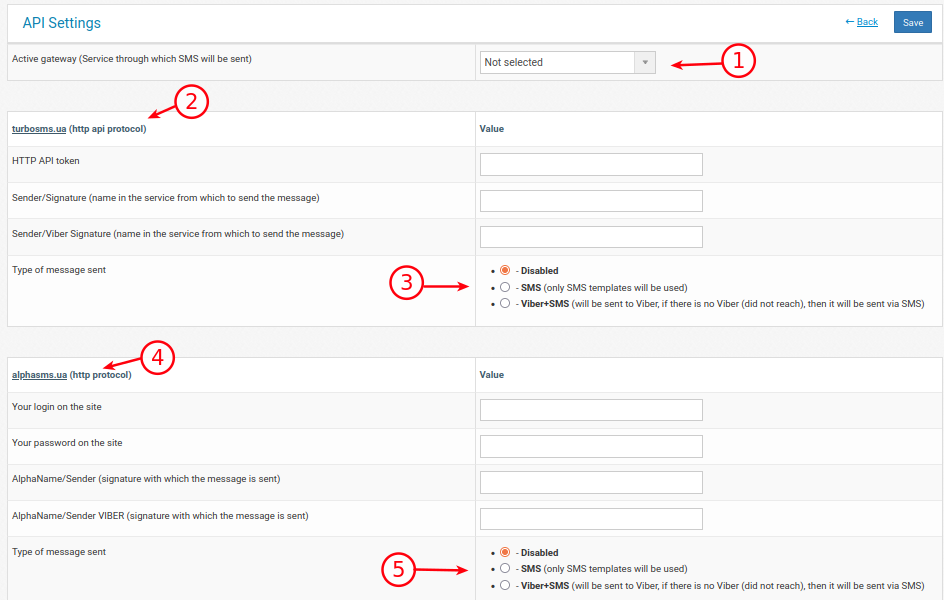
1. Selecting the gateway through which SMS sending will work. AlfaSMS and TurboSMS are available
2. Gateway link and protocol, which should be specified when setting up the gateway. The signature for SMS and Viber may differ and is obtained separately from each other.
3. Selecting the message delivery method.
4. Gateway link and protocol, which should be specified when setting up the gateway. AlphaName for SMS and Viber may differ and is obtained separately from each other.
5. Selecting the message delivery method.