


Installing on localhost in Windows
If in Linux systems there is LAMP (Linux Apache Mysql Php) for local launch of sites, then in Windows there are also simplified assemblies of a local server that allow you to quickly launch a site for testing.
OpenServer is exactly such an assembly. .
Installation is simple, choose where OpenServer Panel will be installed, by default it is "C:\OSPanel" and follow "Next >" agreeing with everything and reading the terms of the agreement.
After installation and launch, a red flag will appear in the panel below.

1. Go to the directory where you installed OSPanel (in our case, "C:\OSPanel"), we are interested in the domains folder ("C:\OSPanel\domains")
2. Create a "project.loc" folder (required with the .loc zone) and unpack the contents of the archive with the site there (so that the index.php file is in project.loc)
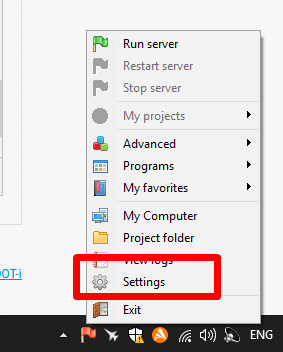
3. Select "Settings".
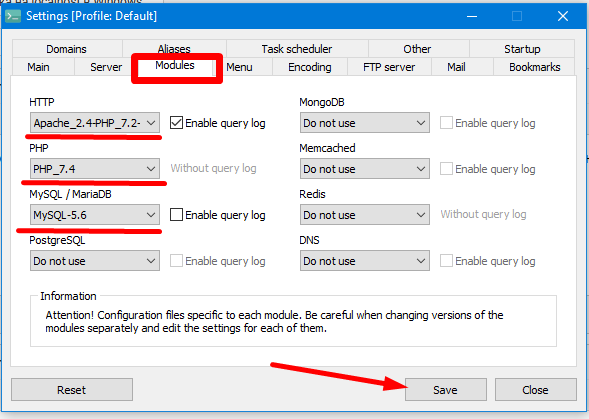
4. We set the following parameters and versions, save.
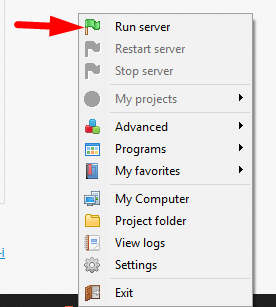
5. Click start, the flag in the control panel turns green, after which you can work with the site.
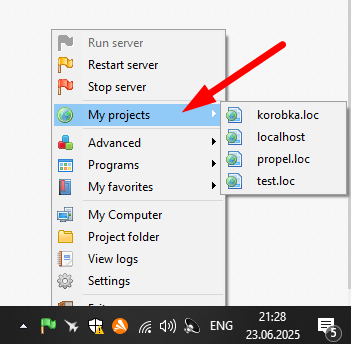
6. The site will be available in this tab when the server is running.
P.S. Login to the database via phpmyadmin is "root", and password empty, it is not used by default. Therefore, when installing the site on a local server, leave the password for the database EMPTY!