


Template manager
To start customizing the design and its elements, go to "Modules -> All modules -> Template manager".
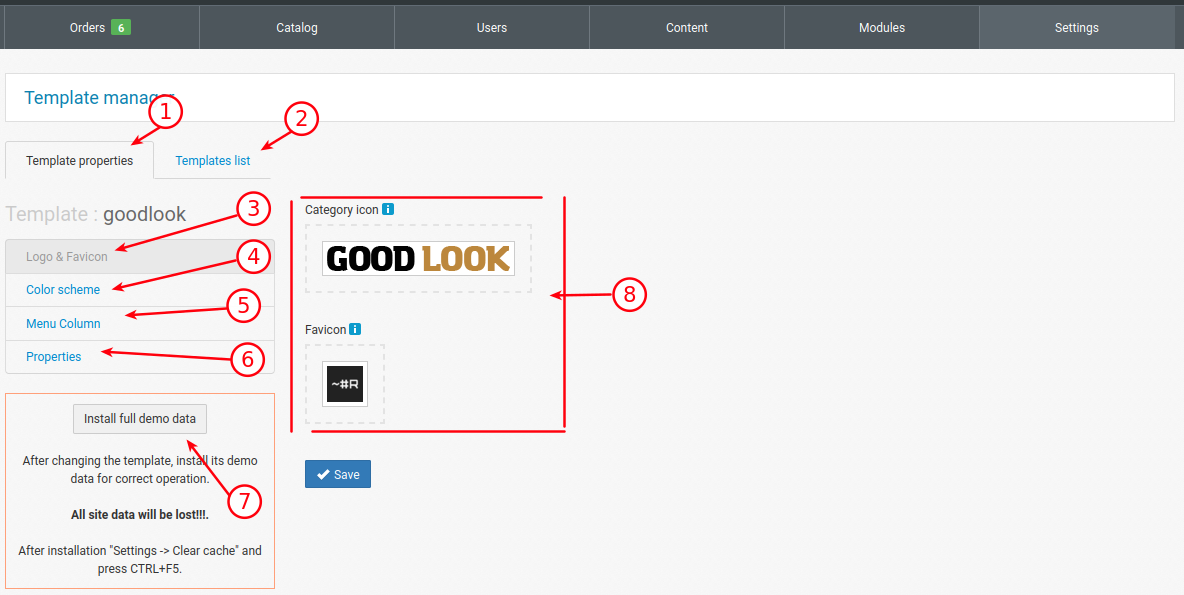
1. Settings tab
2. Template selection tab (there are 6 templates). The template is selected at the beginning of the site. Changing it after filling it with products and content is NOT RECOMMENDED, since for the template to work properly, you need to install DEMO DATA (7).
3. Logo and icon settings (8)
4. Setting up the color scheme (not currently used in templates, for the future)
5. Setting up the deployment of the category menu on the site. The ability to choose whether the menu will drop down gradually or open immediately with nested categories, as well as specify the width of the opening menu.
6. Setting up the output of the filter (properties) in categories. The display of the property in the category filter can be complete, the property can be drop-down (dropDown) and with scroll (scroll)
7. Installing Demo data. Attention!!! leads to content clearing and is used only when changing the template at the beginning of the site creation (1).