


Discounts
To start working with discounts and discount certificates, go to "Modules -> All modules -> Discounts".
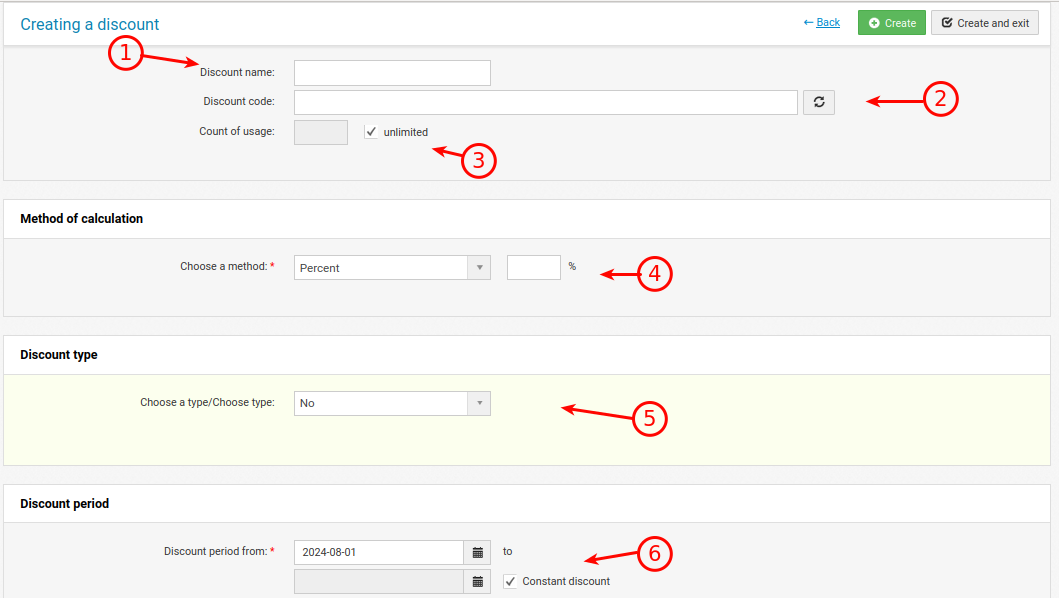
When editing and creating a discount, you can customize:
1. Discount name (visible only in the admin panel)
2. Discount code. You can leave it blank or generate it automatically. In most cases, it is needed for a "gift certificate". The buyer will enter this code in the shopping cart.
3. The number of times the discount can be used.
4. Discount type. Static (the number of conventional units in the main currency) and percentage (percentage of the order amount, product, etc.)
5. The ability to select what the discount applies to (Certificate, discount on product, on the basket, on the user, on the category, on the brand). Some types of discount are displayed only in the basket or only when the selected conditions are met.
6. Some types of discounts have the ability to specify a time frame during which they are triggered.
After creating a discount, check its operation (it may not work as you expect).
Individual prices of the user are intertwined with the use of discounts (static and percentage individual prices are involved in the formation of the price in the basket and order).
If the product is set to an old price, then it is always in priority and cancels the triggering of some discounts.