


Smart filter
To start working with metadata of categories with an active filter, go to "Modules -> All modules -> Smart fliter".
Attention! The "Smart filter" module should be below the "SEO expert" module in the "Modules -> All modules" tab.
The module is designed to assign unique meta data (patterns) to the sample pages created when the user filters products on the product category page.
This module works with samples in which the user filters by:
- brand:
- property:
- specific property value (or several property values)
The administrator can use the following parameters to create a sample pattern:
- Category + Brand
- Category + Property (+ all value or specific)
- Category + Brand + Property (+ all value or specific)
The purpose of the module is to promote the store in search results, for a narrow request, (for example: "buy a black Nokia phone" - where:
- black is the value of the conditional property "Color"
- phone - Product category
- Nokia is the manufacturer brand.
The result is achieved by creating a separate page for filter selection and assigning unique metadata to it.
Note:
In this case, interaction with the user is not taken into account.
That is, if the user on the category page during filtering selects the brand/property/value combination previously provided by the administrator, then the metadata specified through the Smart filter module for this selection will be displayed.
But if the combination does not match completely (for example, when filtering an additional brand or property will be added), then the general settings will be pulled up.
In this case, the administrator can specify the following unique data for the selection page:
- Heading (H1)
- Meta title
- Meta description
- Keywords
- SEO text - short text displayed only on the selection page (used for promotion)
Note:
If you need to customize meta data for individual categories or brands, use the data settings, individual pages, or the SEO Expert module.
Rules (patterns) list

1. General settings. If there are no individual patterns, then the general meta settings specified in this tab will be applied. They only work when using the property and (or) brand filter.
2. The ability to create many individual patterns in bulk according to specified rules (select brands or properties) and set a meta template for them.
3. Single pattern creation. Like mass, but used to create and fill one rule with metadata.
4. List of created individual patterns. The ability to edit them.
General settings
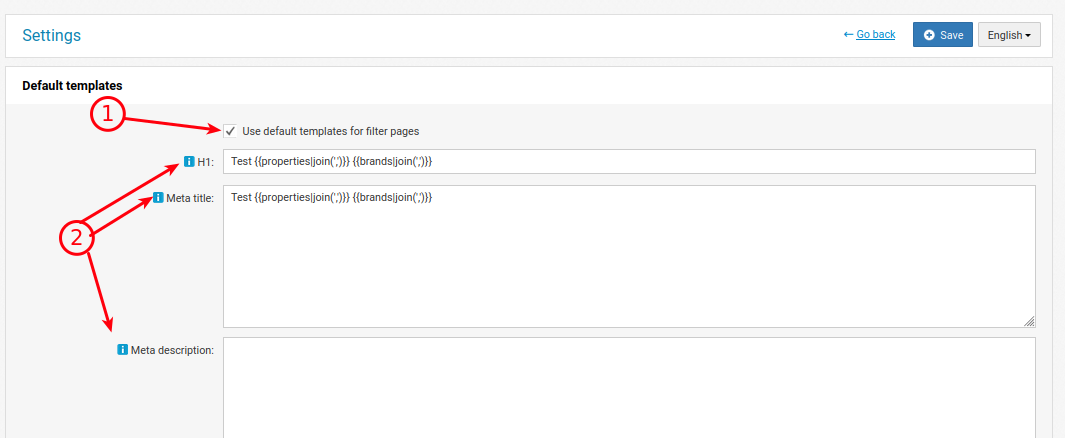
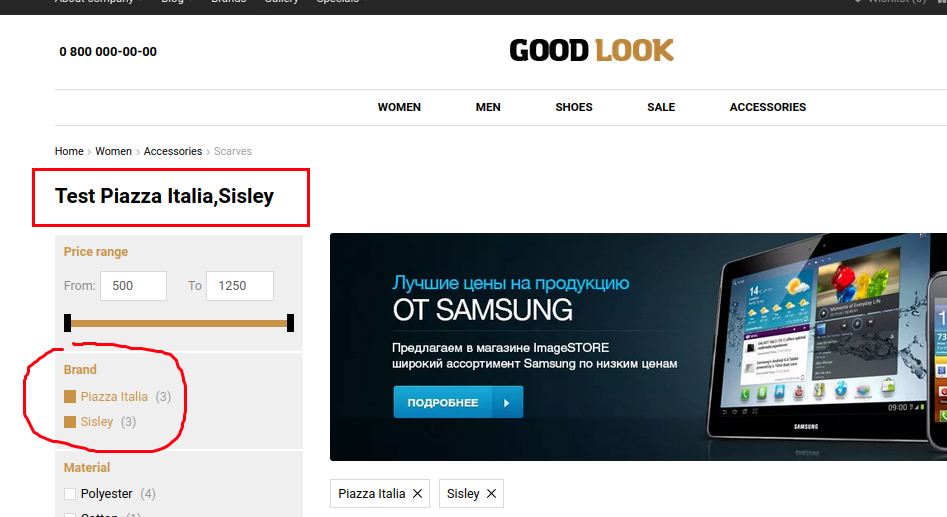
1. If the checkbox is active, then when filtering in a category, this metadata will be displayed, but on the condition that there are no individual patterns for such filtering.
2. List of variables that can be written into the template. They will be replaced by data from the category.
Remember that the data is multilingual. If the site uses several languages, you should fill in the ones you need.
Create/Edit/Bulk create
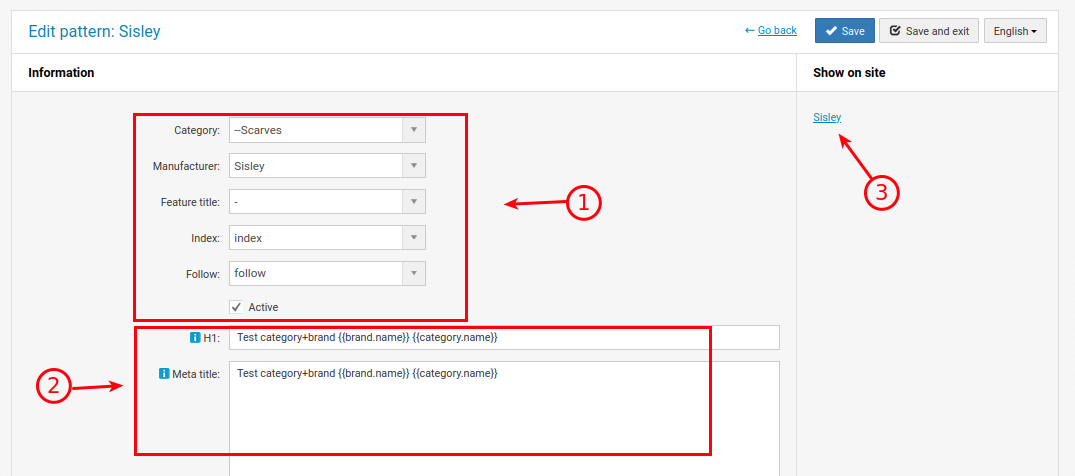
1. Parameters are set by which the rule will be triggered and the output of meta-data will be triggered.
2. Meta-data that will be output.
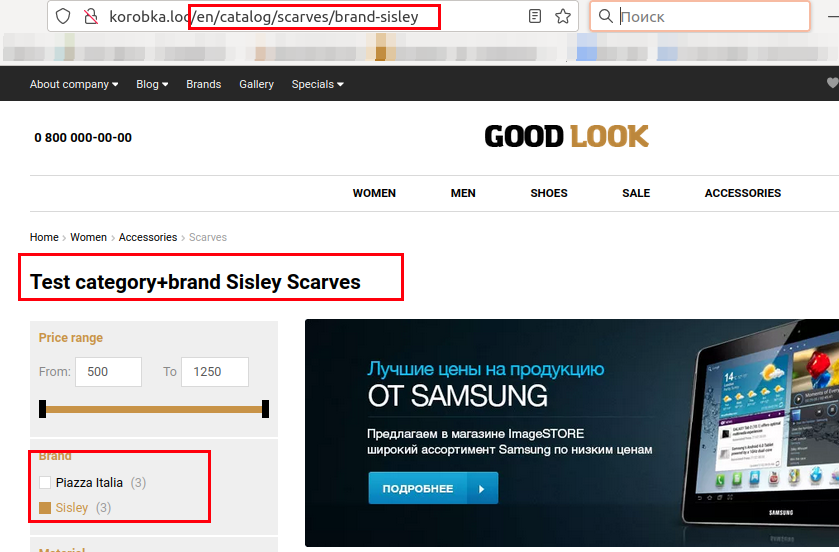
3. Matches with the link to the site for data verification.
Don't forget that the data is multilingual. If the site uses several languages, you should fill in the ones you need.
In this case, the link "/catalog/scarves/brand-sisley" works.
Variables in patterns
{{category.id}} - Category ID
{{category.name}} - Category name
{{category.description}} - Category description
{{minPrice}} - Minimum price in the category
{{maxPrice}} - Maximum price in the category
{{property.name}} - Property
{{value.name}} - Value
{{brand.name}} - Brand
Additional parameters to use with the category name:
|translit - Translit
|morphy(1..6) - word case number
Example:
{{category.name|morphy(1)}} - Nominative
{{category.name|morphy(2)}} - Genitive
{{category.name|morphy(3)}} - Dative
{{category.name|morphy(4)}} - Accusative
{{category.name|morphy(5)}} - Instrumental
{{category.name|morphy(6)}} - Prepositional
{{category.name|morphy(1..6)|translit}} - Sharing .